Overview
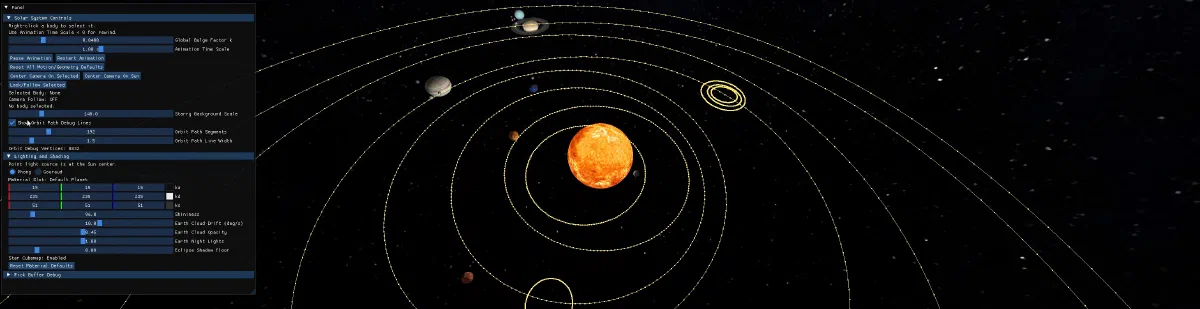
This project is an OpenGL-based interactive virtual orrery built with C++20, GLFW, GLAD, GLM, and ImGui. It renders a textured Solar System scene with hierarchical transforms, instanced indexed geometry, object picking, real-time animation controls, shading modes, advanced Earth texturing, eclipse-style shadowing, and camera follow tools.
Implemented Features
Core Rendering and Scene Features
- Indexed UV sphere generation with normals and UVs.
- Indexed ring mesh generation for Saturn rings.
- Instanced rendering for spheres and rings with per-instance attributes:
- model matrix
- texture slot
- material slot
- lit/unlit flag
- logical body ID
- Dynamic hierarchical Solar System:
- Sun-centered world frame
- planets orbit Sun
- moons orbit parent planets
- parent-child transform inheritance
- Elliptical orbit kinematics using solved eccentric anomaly.
- Per-body spin and orbit controls.
- Bulge computed from angular velocity using u = k * omega^2 (clamped).
Lighting and Shading
- Point light source at Sun center.
- Two shading modes:
- Phong
- Gouraud
- Per-material ka, kd, ks, and shininess controls via UI.
- Earth-focused advanced shading:
- normal mapping
- specular mapping
- independent cloud layer drift
- day/night blend with city lights
- Eclipse-style attenuation for Earth/Moon lighting using line-segment to sphere intersection tests.
Sky and Environment
- Star background body rendered around camera.
- Cubemap generation at startup from an equirectangular star texture.
- Sky rendered through cubemap sampling path when available.
Interaction and Tools
- Integer ID pick buffer (off-screen framebuffer) for object selection.
- Right-click object selection.
- Camera follow lock to selected body.
- Center camera on selected body or Sun.
- Orbit debug line rendering pass with UI toggles and controls.
- Pick buffer debug visualization panel.
Runtime Controls
Mouse
- Left mouse drag: rotate turntable camera.
- Mouse wheel: zoom camera radius.
- Right mouse click: pick/select body.
ImGui Panels
Solar System Controls
- Global bulge factor.
- Animation time scale (supports negative for rewind).
- Pause/Play animation.
- Restart animation.
- Reset simulation defaults.
- Center camera on selected body.
- Center camera on Sun.
- Lock/Unlock camera follow for selected body.
- Per-selected-body editing:
- body scale
- axis speed
- orbit radius
- orbit eccentricity
- orbit tilt/orientation
- orbit speed
- Star background scale.
- Orbit debug line options:
- show/hide debug lines
- segment count
- line width
- live debug vertex count
Lighting and Shading
- Shading mode switch (Phong/Gouraud).
- Material editor for selected body material slot.
- Earth cloud drift speed.
- Earth cloud opacity.
- Earth night-light intensity.
- Eclipse shadow floor.
- Material reset button.
Pick Buffer Debug
- Cursor framebuffer pixel index.
- Hovered object ID.
- Toggle pick buffer display.
Build and Run
Prerequisites
- CMake 3.15 or newer
- C++20 compiler
- OpenGL 3.3 capable runtime
Third-party dependencies are vendored in the repository and built by CMake:
- glad
- glfw
- glm
- fmt
- stb
- imgui
- argh
Configure
cmake -S . -B build
Build
cmake --build build --target VirtualOrrery
Run
On Windows:
build/VirtualOrrery.exe
On Linux/macOS:
./build/VirtualOrrery
The project is platform-agnostic and should build on Windows, Linux, and macOS with a suitable C++ toolchain and OpenGL support. Ensure your GPU drivers are up to date for best compatibility.
My primary development environment was Windows 11 with Visual Studio 2026 and an NVIDIA/INTEL hybrid GPU setup with the latest MSVC compiler (Microsoft (R) C/C++ Optimizing Compiler Version 19.50.35724 for x64).
Project Structure
application
- Application.h / Application.cpp
- scene setup, update loop, rendering passes, UI, animation, camera follow
- MeshGeneration.h / MeshGeneration.cpp
- indexed sphere and ring generation
- Geometry.h / Geometry.cpp
- indexed + instanced GPU geometry abstraction
- Camera.h / Camera.cpp
- turntable camera model
- ApplicationCallback.h / ApplicationCallback.cpp
- GLFW input callbacks and camera interaction
- main.cpp
- app entry point
- Application.h / Application.cpp
core
- PickBuffer.h / PickBuffer.cpp
- integer ID picking framebuffer
- Texture.h / Texture.cpp
- texture loading and GL upload
- GLHandles.h / GLHandles.cpp
- RAII wrappers for GL objects
- PickBuffer.h / PickBuffer.cpp
assets/shaders
- phong.vert / phong.frag
- primary shading pipeline
- pick.vert / pick.frag
- picking pass
- pick_debug_viewer.vert / pick_debug_viewer.frag
- pick visualization
- orbit_debug.vert / orbit_debug.frag
- orbit debug line pass
- phong.vert / phong.frag
assets/textures
- planetary color maps
- Earth day/night/cloud/specular/normal maps
- Saturn ring alpha texture
- star maps
Rendering Pipeline Summary
- Update body transforms and animation state.
- Upload instanced sphere/ring attributes.
- Main lit render pass:
- spheres (instanced indexed draw)
- rings (instanced indexed draw)
- Orbit debug line pass (optional).
- Pick pass to off-screen integer ID framebuffer.
- Optional pick debug full-screen visualization.
Known Notes and Current Limitations
- Eclipse attenuation currently targets Earth/Moon pair logic.
- Sky cubemap is generated from an equirectangular star map at startup using nearest sampling during conversion.
- Orbit debug lines currently represent sampled orbit guides based on current hierarchy state.
Cited Resources
- Texture source catalog: https://www.solarsystemscope.com/textures/
- Normal mapping reference: https://learnopengl.com/Advanced-Lighting/Normal-Mapping
- Specular lighting map reference: https://learnopengl.com/Lighting/Lighting-maps
- Blending and layered texture effects: https://learnopengl.com/Advanced-OpenGL/Blending
- Cubemap and skybox reference: https://learnopengl.com/Advanced-OpenGL/Cubemaps
- Line-sphere intersection math reference: https://en.wikipedia.org/wiki/Line%E2%80%93sphere_intersection
- Point-line distance math reference: https://en.wikipedia.org/wiki/Distance_from_a_point_to_a_line
- GLFW documentation: https://www.glfw.org/docs/latest/
- GLM documentation: https://glm.g-truc.net/0.9.9/index.html
- ImGui repository and docs: https://github.com/ocornut/imgui